
ACO96 on your phone: a web app, not a store download
There is no APK to chase and nothing in the App Store. The casino installs to your home screen from the browser in about thirty seconds, and the mobile layout is the one the platform was designed around.
Mobile is the primary interface here
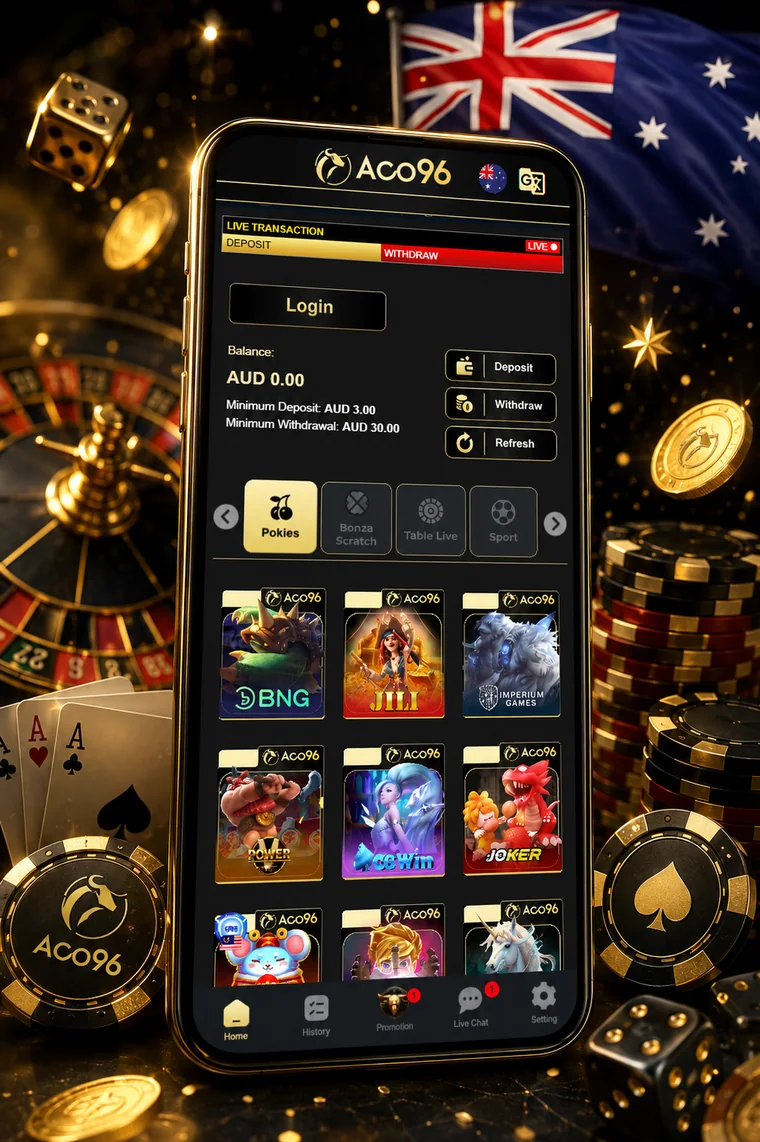
Look at the ACO96 desktop site and you can see the mobile design underneath it — a single-column lobby, a bottom navigation bar with Home, History, Promo, Live Chat and Settings, and an account panel that behaves like a drawer. That is not laziness. The platform's core market plays almost entirely on handsets, and the desktop view is the adaptation rather than the original.
For an Australian player that is good news. Everything that matters — the cashier, the balance widget with its printed deposit and withdrawal minimums, the provider grid, the promo tab — is built for a thumb. Nothing important hides behind a hover state, and the game tiles are sized for a phone screen rather than shrunk down from a desktop grid.
What you give up is screen real estate for live tables. A baccarat stream on a 6-inch display is workable; a blackjack table with a full side-bet menu is cramped. If streamed tables on a small screen are your main reason for playing, a tablet is a noticeably better experience than a phone.
Adding it to your home screen
Android — Chrome
- Open the casino in Chrome.
- Tap the three-dot menu, top right.
- Choose Add to Home screen (some builds label it Install app).
- Confirm the name and tap Add.
- Launch from the new icon — it opens full screen without the browser chrome.
iPhone — Safari
- Open the casino in Safari. Chrome on iOS will not do this.
- Tap the Share icon at the bottom of the screen.
- Scroll and choose Add to Home Screen.
- Name it and tap Add.
- Launch from the icon for a full-screen session.
Why there is no store app: both Google Play and the App Store apply strict licensing conditions to real-money gambling apps, generally requiring a licence in each country of distribution. The brand’s licensing position is the reason it cannot meet them, and it has nothing to do with the quality of the software. A web app is the honest answer to that constraint — and it also means you are never installing an unsigned APK from a link, which is the far riskier alternative some brands push.
What running it on a phone actually costs you
Rough figures from a week of ordinary use on a mid-range Android handset over 4G.
Live streaming is roughly ten times the data cost of reels. On a limited plan, that is the number to plan around.
Troubleshooting the things that actually break
A game will not load
Almost always a cached asset from a previous version. Force-close the web app, clear the site data in your browser settings, and reopen. If a specific studio fails repeatedly while others work, that studio's own servers are the problem and support can confirm it.
The balance is wrong after a session
Use the Refresh control in the account panel. Game sessions and the wallet sync on a delay, and the number you see on the lobby screen can lag by a minute or two. If it still disagrees after a refresh, check the History tab before opening a chat — you will need the transaction reference anyway.
The stream stutters on live tables
Video quality adapts to your connection, but a phone switching between Wi-Fi and mobile data mid-hand is a reliable way to drop a stream. Lock to one connection before you sit down, and prefer Wi-Fi if the plan allows — see the data figures above for why.
Notifications
An installed web app can request notification permission. Grant it if you want withdrawal confirmations pushed to you; decline it if you would rather not have promotional prompts arriving at ten at night. That second consideration is not trivial — push notifications from a casino are designed to restart sessions, and the easiest way to not act on one is to never receive it.
Playing on a phone responsibly
Everything that makes mobile convenient also makes it frictionless, and friction is the only natural brake in gambling. A casino on your home screen is a casino in your pocket during a lunch break, on the train, at two in the morning when you cannot sleep. The AUD 3 minimum deposit removes the last speed bump.
Practical counterweights that cost nothing: turn off notifications, do not save your password in the browser, keep the icon off your first home screen page, and set a deposit limit in the account settings while the decision is still theoretical. The operator states it offers deposit limits, cool-down timers and self-exclusion options — use them early rather than as a rescue.
If the phone has stopped being entertainment, free and confidential help is available anywhere in Australia through Gambling Help Online on 1800 858 858, 24 hours a day, and BetStop is the national self-exclusion register. Both are free and neither requires you to explain yourself.